
効果的な招待メールの書き方に悩んでいませんか?効果的な招待メールを作成することで、出席率を高め、会議の雰囲気を盛り上げることができます。この記事では、注目され、返信される招待状を作成するのに役立つ10のヒントとテンプレートをご紹介します。.
要点
- 効果的な会議案内メールは、プロフェッショナルな雰囲気を演出し、出席者に会議の詳細を確実に伝えることで、誤解や出席率の低下を防ぎます。.
- 成功する招待状の主な要素は、明確な件名、包括的な会議の詳細、受信者の関心を引くための個人的な工夫などです。.
- テンプレートやスケジュール管理ツールを使うことで、会議の案内をより明確に、効率的に、プロフェッショナルにすることができます。.
効果的な会議招待メールの重要性
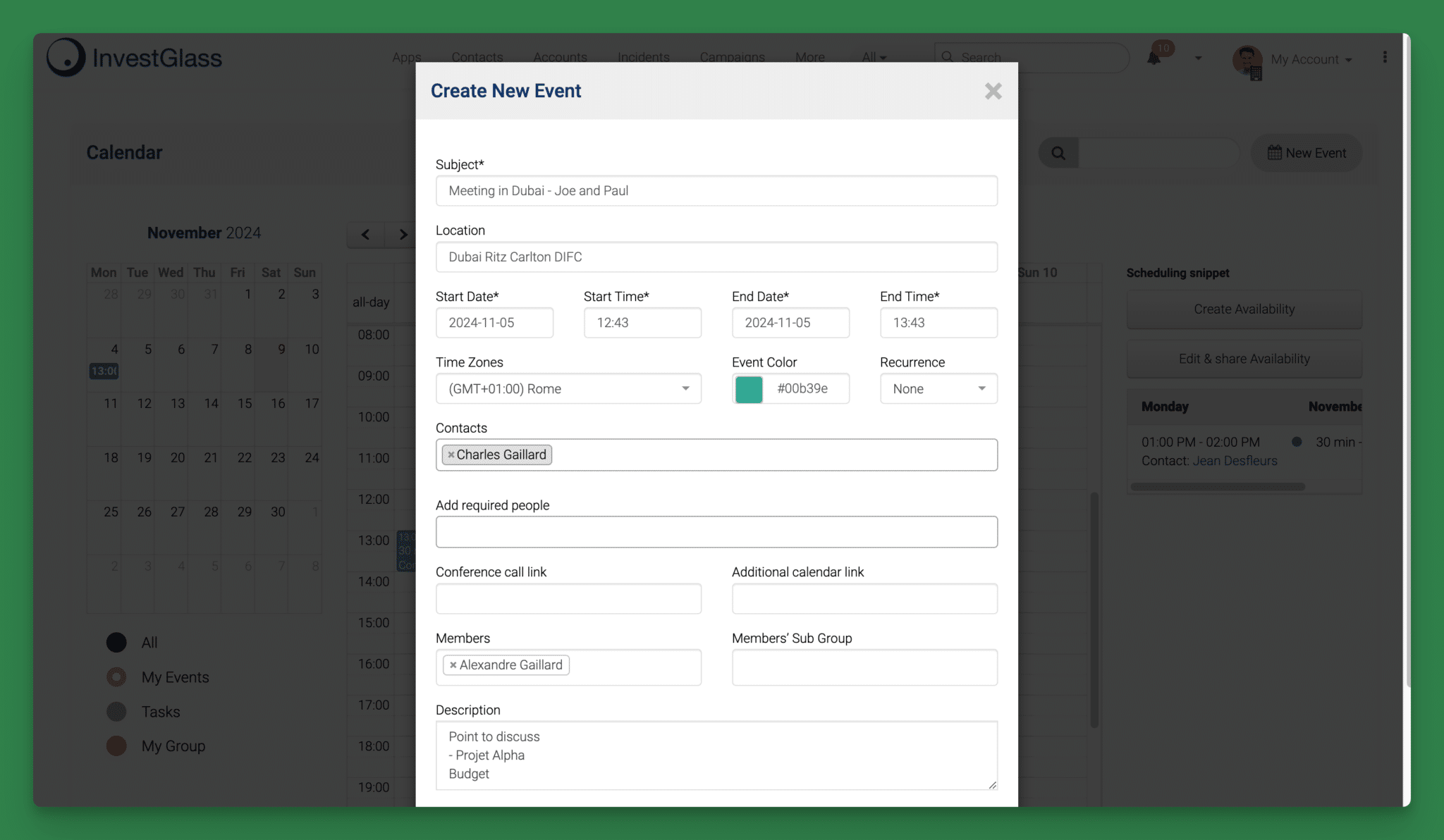
Meeting invitation emails play a crucial role, serving not just as informational notes but also as the preliminary image of your forthcoming meeting. When crafted skillfully, they help to place the event firmly on the participants’ agendas and encourage them to regard it with importance. A lack of an apt invitation raises the risk that attendees will overlook or disregard the gathering. An expertly designed invite conveys professionalism and lays down an optimistic groundwork for the proceedings.
Introducing the concept of the meeting lifecycle is essential, as it encompasses the various stages and processes that occur before, during, and after a meeting. Managing these stages effectively enhances collaboration and reduces inefficiencies.
These invitations are instrumental in enlightening participants about what is expected at this upcoming engagement: detailing objectives and any preparatory steps required, fostering unity and awareness amongst those involved. Adjusting how you phrase your communication so that it resonates well with its intended audience can greatly amplify its resonance and effectiveness.
Ultimately, factors such as composition, substance, transparency of information presented within a meeting invitation email have profound influence over whether it accomplishes its purpose effectively.
会議の招待メールに欠かせない要素

Crafting an effective meeting invitation via email demands attention to essential components, ensuring the invite is not only compelling but also exudes professionalism. Such elements encompass a concise subject line that immediately informs the recipient of the content, detailed information about the meeting itself, and incorporating a personal touch which adds warmth and engagement.
It’s crucial to provide a distinct call to action within your email that specifies when and where (for in-person gatherings) this interaction will occur. Clarity here eliminates any potential confusion regarding event logistics. Now let’s delve deeper into each element for better understanding.
明確な件名
Your meeting invitation’s subject line is vital. It dictates whether the recipient will open the email or not. Striving for brevity, aim for a subject line length of 36-50 characters to improve chances of the email being read. Clear and precise subject lines have shown a 47% higher chance of being opened over those that are ambiguous, leading commonly to disinterest.
Not only does a succinct subject line capture attention, but it also establishes expectations for the content of your meeting-related communication.
明確で簡潔なメール本文を作成する
フォローアップ・メールを作成する際には、明確で簡潔な文章を作成することが不可欠である。 メール本文 あなたのメッセージを効果的に伝えるメール本文は、簡潔な紹介文、明確な目的、具体的なコールトゥアクションを含むように構成しましょう。ここでは、明確で簡潔なメール本文を作成するためのヒントをいくつかご紹介します:
- 簡潔に要点をまとめる:メール本文は100~150ワード以内を目安に。.
- 簡単な言葉を使う:相手を混乱させるような専門用語の使用は避けましょう。.
- 箇条書きまたは番号付きリストを使用する:大きなテキストブロックを、より消化しやすい小さな塊に分割する。.
- 明確で簡潔なフォーマットを使用する:見出し、小見出し、空白を使い、メールを読みやすくしましょう。.
Example of a clear and concise email body:
“Hi [Recipient],
I wanted to follow up on our previous conversation regarding [Topic]. I believe our solution can help you [Achieve a specific goal]. I’d love to schedule a call to discuss further.
Best, [Your Name]”
ミーティングの詳細を含む
Ensuring that your meeting invitation contains all the essential details is crucial for ensuring attendees are informed and on time. It’s imperative to clearly articulate the specifics of who, what, where, when, and why related to the meeting. Employing clear and concise language helps eliminate any potential ambiguity which could lead to misunderstandings among participants.
Additionally, keeping meeting attendees informed and engaged by providing additional agenda details or pre-reads can enhance their preparedness and overall participation, thus facilitating a more efficient and productive meeting experience.
To improve readability and help invitees retain important information about the meeting more effectively, use formatting strategies like bullet points as well as a layout that’s easy to navigate on mobile devices. Providing precise location information be it an actual physical address or a link for video conferencing is vital in facilitating complete attendance at your event.
パーソナル・タッチを加える
Tailoring your meeting invitation emails by incorporating the recipient’s name can notably boost their engagement, as it grabs their attention and conveys a sense of appreciation. Including tailored details that pertain to an invitee’s unique role or achievements amplifies the significance of the meeting for them, thereby enhancing the likelihood of their participation.
Employing these strategies for personalizing invitations not only fosters greater involvement but also aids in forging more robust relationships with those you are inviting to your meetings.
ミーティング招待メールテンプレート
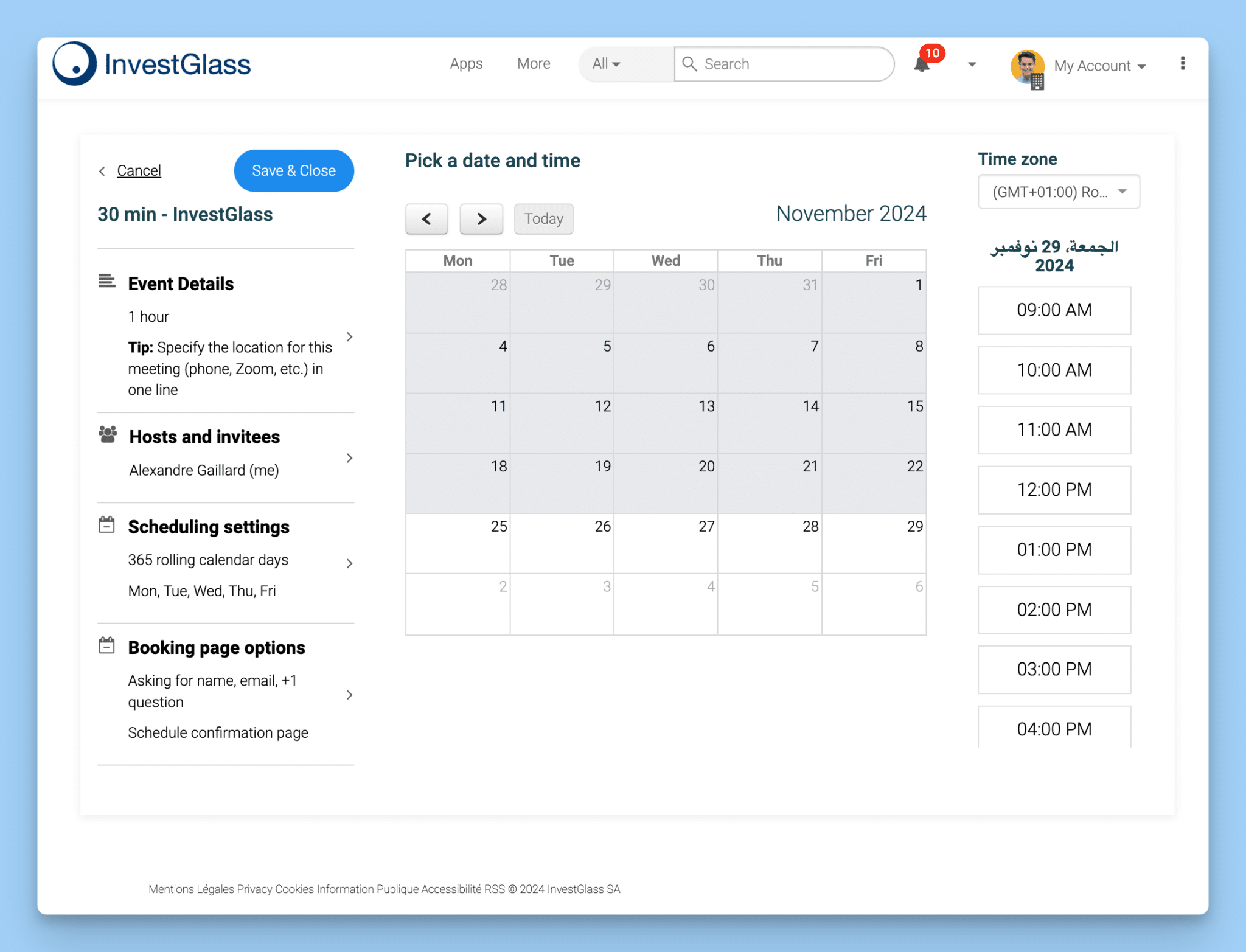
効果的な会議招待メールを作成する際、テンプレートは救世主となります。時間を節約し、一貫性を確保し、簡単に作成することができます。 カスタマイズ to match your voice, meeting type, and industry. Using the right templates not only enhances clarity and professionalism, but also increases engagement.
Additionally, utilizing a follow up email template can maintain consistency and effectiveness in your follow-up communications, especially in link building and メール配信.
Let’s explore some specific templates for different types of meetings, from team meetings to ウェビナー.
チームミーティングのご案内
Collaboration and alignment within a team are greatly enhanced by holding regular team meetings. To effectively summon recipients to attend a particular meeting, it’s crucial to send an official meeting invitation email that is well-outlined with all vital information. ‘Invitation: Team Meeting on [Day]’ serves as an appropriate subject line for the invitation to the team meeting, unequivocally conveying the intent and substance of the communication.
Employing standardized templates for shared meetings guarantees that consistency in your communications is preserved by automatically associating each gathering with its proper agenda according to the objective of these meetings.
個別ミーティングのご案内
One-on-one meetings are crucial for personal interactions and detailed discussions. A recommended subject line for such an invitation is ‘Let’s Schedule a Time to Discuss [topic]’ and include a meeting request.
The body should include the meeting time, supporting documents, and goals, and invitees can easily schedule the meeting using the provided meeting link.
クライアント・ミーティングのご案内
クライアントとのミーティングは、関係を維持・促進するために欠かせない。件名は魅力的なものにしましょう。会社名]との次のシンクの時間です'のようなものを考えてみましょう。友好的でありながらプロフェッショナルな口調にし、Calendlyのリンクを貼ることで簡単にスケジュールを組むことができます。.
インタビュー・ミーティングのご案内
Interview invitations need to be clear and detailed. Please use the subject line: ‘Invitation to interview for [Role]’. This should be followed by the company name, ‘[Company Name]’. The body should schedule a call, provide information about the candidate’s background, role details, and the organization.
Additionally, include your name, title, company name, and contact information in the closing.
セールス・コール
例えば、“【リードソース】をありがとうございます。どのようなお手伝いができるかを探るために、簡単なチャットが可能かどうかを尋ね、ミーティングを予約するのに便利なリンクを提供することで、受信者の関与を促します。.
ウェビナーのご案内
ウェビナーへの招待状には、魅力的な件名を付け、簡潔に紹介し、ウェビナーに関する重要な情報を提供する必要があります。また、ウェビナーへの登録プロセスを参加者に指示する明確なコール・トゥ・アクションを用意し、招待状内に登録用のリンクを組み込むことで、簡単に登録できるようにします。.
より良い会議招待状を書くためのヒント
Crafting superior invitations for meetings can markedly improve both engagement and communication. Invitations that are well-composed ensure that attendees are properly notified about the meeting details while also motivating them to participate.
To ensure your invitations catch the attention of potential participants, we will examine several key points on how to distinguish your meeting invites from others.
短く、そして甘く
When crafting meeting invitation emails, it’s important to be succinct. A brief email shows consideration for the invitee’s time by highlighting only the necessary details. Employing bullet points can enhance clarity, enabling recipients to swiftly comprehend critical information.
It’s also crucial to find a balance in follow-up emails. While persistence is key, sending too many follow-ups can be perceived as desperate or pushy, potentially annoying the recipient. Conversely, too few follow-ups can result in lost momentum.
By steering clear of superfluous details, you prevent bombarding recipients with too much information and help maintain their attention on the principal aspects of the meeting.
明確で簡潔なコール・トゥ・アクションの使用
フォローアップメールには、明確で簡潔なコールトゥアクション(CTA)が不可欠です。CTAは受信者に次に取るべき行動を伝え、会話を前進させるのに役立ちます。ここでは、明確で簡潔なCTAを作成するためのヒントをご紹介します:
- 具体的に:受信者にどのような行動を取ってほしいかを明確に述べる。.
- 行動志向の言葉を使う:“電話を予約する”、“このメールに返信する”、“このリンクをクリックする ”などの動詞を使う。”
- 危機感を持つ:“期間限定オファー ”や “独占チャンス ”などのフレーズを使い、切迫感を演出する。”
Example of a clear and concise CTA:
“Schedule a call with me to discuss how our solution can help you achieve your goals. Click this link to schedule a time that works for you: [Insert Calendly link]”
聴衆にトーンを合わせる
It is crucial to tailor the tone of your meeting invitation email in alignment with the nature of your audience for successful communication. Incorporating recipients’ names into emails can elevate engagement and promote better response rates. Opt for a formal approach when extending invitations to superiors, whereas adopting an informal manner may be more appropriate among familiar coworkers.
Aligning the tone suitably fosters favorable replies and boosts the chances that invitees will participate in the meeting.
送信前の校正
校正は、メールの誤字脱字、文法的な間違い、ぎこちない言い回しなどを見つけるために非常に重要です。プロフェッショナリズムを確保し、明確なコミュニケーションを維持するのに役立ちます。ミーティングの招待状を送る前に 会議のリンクと受信者の電子メールアドレスの正確性.
Reviewing a preview of your email helps verify its appearance and ensures the subject line is complete.
会議の招待にスケジュール管理ツールを使う
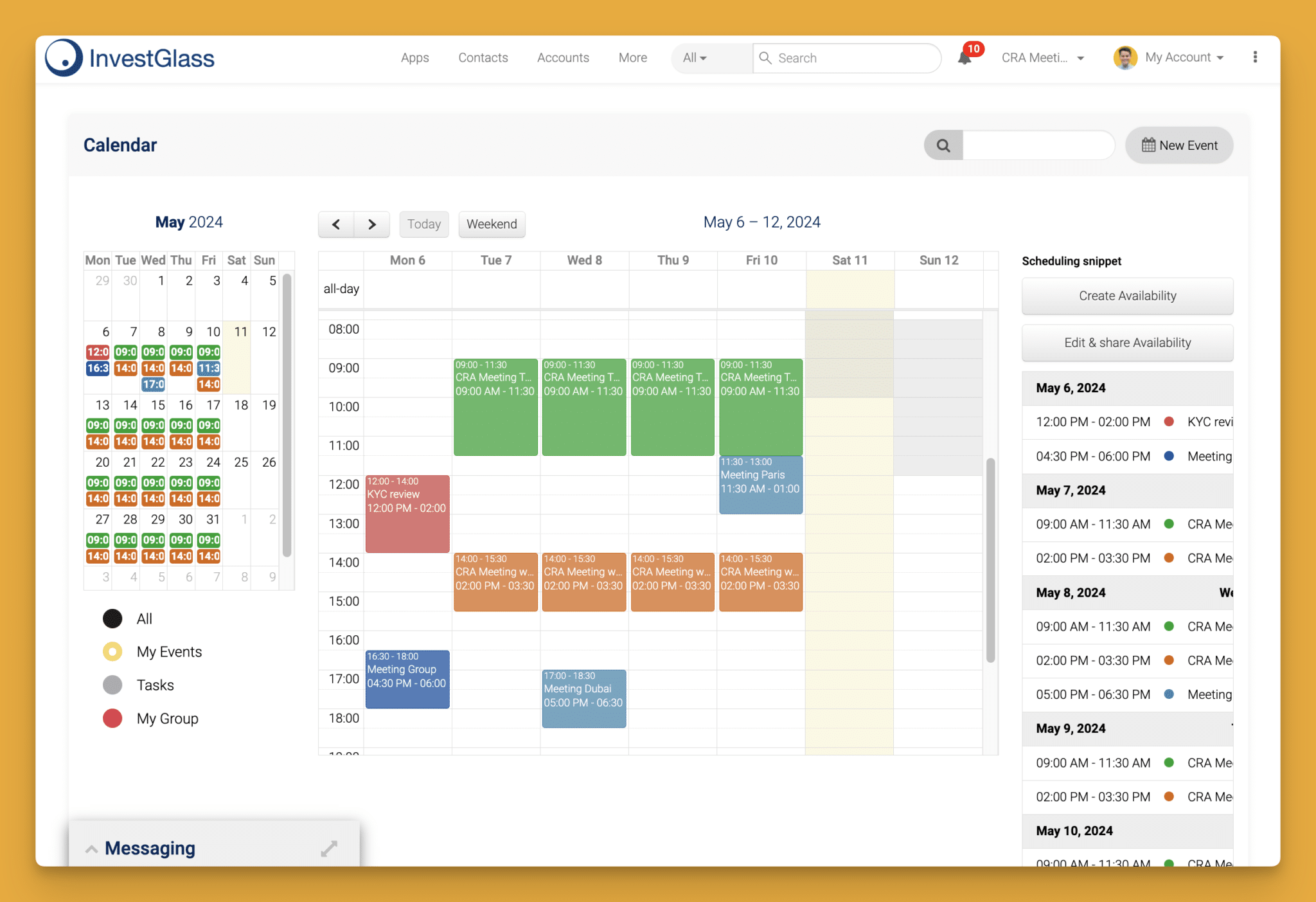
Utilizing scheduling applications such as Google Calendar and Calendly can greatly improve the management of meetings, facilitating you to arrange them with ease. The use of meeting invites simplifies the coordination required for meetings by reducing the necessity for manual follow-ups.
However, using multiple tools to schedule meetings can lead to valuable information getting lost, as different team members may use various incompatible systems. This reliance on distinct platforms like Google Calendar and Evernote can result in a lack of shared visibility and miscommunication among stakeholders, ultimately impacting the effectiveness of the meeting lifecycle.
Investigating how incorporating scheduling links into your invitations along with setting up automated reminders could make your approach to organizing a meeting even more successful is worth considering.
スケジューリング・リンクの追加
Incorporating a scheduling link within your meeting invitation streamlines the coordination of appointments and eliminates the need for prolonged email exchanges. Utilizing platforms such as Calendly, attendees can effortlessly select from time slots that automatically adjust to their respective time zones.
To facilitate this process, you may include your personal booking URL directly into the invitation or improve user experience by embedding clickable options displaying specific dates and times from which invitees can make their selection.
会議リマインダーの自動化
Reminders that are sent automatically serve an important function in ensuring meetings remain a priority, which leads to better participation. By setting these reminders to go off at different intervals prior to a meeting, the likelihood of attendees showing up is increased.
With platforms such as Calendly, users have the capability to create personalized workflows for dispatching alerts, encompassing テキストメッセージ を通知した。.
ミーティング招待後のフォローアップ・メール
After extending invitations for a meeting, it’s essential to send follow-up emails that affirm participation and convey extra information. Such emails play a pivotal role in maintaining the momentum of dialogue post-meeting by elucidating the forthcoming actions.
Examining when and what to include in these follow-up communications can greatly enhance their impact, fostering an environment where clarity regarding next steps is prioritized.
フォローアップのタイミング
It is recommended to wait around two to three days after your initial outreach before sending the first follow-up email. Afterward, consider sending a second follow-up four to five days following the first one, and schedule a third follow-up for one week following the second.
Care should be taken not to send an excessive number of follow up emails, as doing so may come across as overly eager or aggressive. Thus, proper timing of these communications is critical in order not to create an unfavorable impression.
メールフォローのやり過ぎ
メールのフォローアップをやり過ぎると、受信者は大きな嫌悪感を抱きます。フォローアップと受信者の時間を尊重することのバランスを取ることが重要です。ここでは、メールフォローのやりすぎのサインをいくつかご紹介します:
- 短期間にたくさんのメールを送りすぎている。.
- 相手に返事をする十分な時間を与えていない。.
- 各メールに価値を提供していない。.
Eメールでのフォローアップをやりすぎないようにするには、次のことを心がけましょう:
- メールの間隔を空ける:次のメールを送る前に、受信者に十分な返信時間を与えましょう。.
- 各メールに価値を提供する:各メールが受信者に関連した新しい情報や洞察を提供するようにしましょう。.
- 明確で簡潔なフォーマットを使用する:明確で簡潔な書式を使い、受信者が素早くメールを読み、返信しやすいようにしましょう。.
追加情報の提供
フォローアップ・メールの送信は、会議に参加するすべての人が準備万端であり、会議の意義と目的を知らされていることを確認するための重要なステップです。誤解を防ぐためには、以下のことが重要です。 重要な詳細を含む such as the date, time, place of the meeting, and a list of participants.
Meeting notes play a crucial role in ensuring a consistent and accurate record of discussions, which helps in real-time collaboration among participants.
Reference previous exchanges and summarize earlier conversations within these follow up communications. This assists in refreshing important topics for attendees. By incorporating additional valuable content like fresh insights or pertinent articles into your follow up messages could heighten curiosity levels among recipients 当該メールとのより良いやりとりにつながる.
会議の招待メールで避けるべき一般的な間違い
会議の案内メールを明確にし、必要な詳細を効果的に伝えることで、理解を大きく深めることができます。過剰な情報で招待状を埋め尽くしたり、あいまいな表現を使ったり、会議のアジェンダを書き加えないといった典型的なミスを避けることが重要です。.
情報過多
受信者に大量の情報を与えることは、混乱を招き、参加意欲を減退させる可能性がある。受信者が会議の意義や意図を把握できるよう、重要なポイントを強調するのが効果的です。余計なことは省き、重要なデータに焦点を当て、箇条書きにすることで、プレゼンテーションの明瞭さを高めましょう。.
不明瞭な言葉の使用
Meeting invitation emails that lack clarity or contain ambiguous language can cause confusion and misinterpretation. If the invitations do not provide concrete details, attendees may be left to conjecture about critical elements like the meeting’s schedule and intent. Such uncertainty might contribute to reduced participation since potential attendees might prioritize a meeting whose importance is unclear.
It is important to incorporate precise information and defined goals in your meeting invitations. This helps prospective participants grasp the reasons for convening and facilitates their decision-making regarding attendance at the meeting.
アジェンダの入れ忘れ
Failing to include a meeting agenda can result in participants attending the meeting without a clear understanding of what is expected or the primary issues at hand. This lack of preparation can lead to key subjects not being adequately addressed and diminishes the overall productivity of the meeting.
Informing stakeholders about an upcoming meeting and sharing a clear agenda enhances the value of the meeting and assists attendees in deciding their participation, ensuring that all relevant topics are covered and productive discussions take place.
Conversely, incorporating a concise agenda into invitations for meetings is crucial as it directs attendees towards essential discussion topics and objectives. By making sure that everyone understands what needs to be accomplished during the gathering, an agenda significantly boosts the efficiency with which these aims are met.
コンテンツの価値を高めていない
コンテンツの価値を上げないことは、フォローアップメールでよくある間違いです。各メールで受信者に関連する新しい情報や洞察を提供することが不可欠です。コンテンツの価値を高める方法をいくつかご紹介しましょう:
- 関連記事や研究を共有する:受信者の興味や苦痛に関連する記事や研究を共有する。.
- 限定オファーの提供:受取人だけが利用できる限定オファーや割引を提供する。.
- パーソナライズされたレコメンデーションの提供:受信者の興味やニーズに基づいて、パーソナライズされた推薦を提供する。.
Example of increasing the value in content:
“I wanted to follow up on our previous conversation regarding [Topic]. I came across an article that I think you’ll find interesting: [Insert link to article]. I’d love to discuss how our solution can help you achieve your goals. Schedule a call with me to learn more: [Insert Calendly link]”
概要
要約すると、説得力のある会議の招待状を作ることである。 電子メールは成功のために不可欠である ミーティングへの参加率を高め、実りある成果につなげましょう。注目を集めるような簡潔な件名にし、会議に関する必要な詳細をすべて盛り込み、各招待状に個人的なタッチを加えることに集中しましょう。また、テンプレートや高度なスケジュール管理ツールを活用することで、会議の質を高めることができます。 コミュニケーションプロセスの効率化と高度化. .私たちのガイダンスに従いながら、典型的なミスを回避することで、より効率的なミーティングが実現し、プロフェッショナルなつながりも強化されます。これらの戦術を実践することで、会議の進め方が大幅に改善されるのを目撃してください!
よくある質問
なぜ明確な件名が重要なのか?
A clear subject line is crucial because it grabs attention and sets the tone for your email, making people more likely to open it.
A well-crafted subject can significantly boost engagement and response rates.
会議の招待メールにはどのような詳細を含めるべきか?
Make sure to include who, what, where, when, and why of the meeting, along with a clear call to action and any necessary links.
This way, everyone will know exactly what to expect!
会議の招待メールをパーソナライズするには?
To make your meeting invitation emails more engaging, address recipients by their names and include specific details that relate to them.
This personal touch can boost attendance and make your invite feel more thoughtful.
会議招待にスケジュール管理ツールを使うメリットは何ですか?
Using scheduling tools for meeting invitations really helps streamline organization, cuts down on manual follow-ups, and boosts attendance with automated reminders.
It’s a smart way to keep everyone on the same page!
会議の招待メールで避けるべき一般的な間違いとは?
Steer clear of overloading your meeting invitation with too much information and using vague language.
Always include an agenda to keep things clear and focused!


